Deprecated: Creation of dynamic property WP_Term::$cat_ID is deprecated in /var/www/twodee/blog/wp-includes/category.php on line 378
Deprecated: Creation of dynamic property WP_Term::$category_count is deprecated in /var/www/twodee/blog/wp-includes/category.php on line 379
Deprecated: Creation of dynamic property WP_Term::$category_description is deprecated in /var/www/twodee/blog/wp-includes/category.php on line 380
Deprecated: Creation of dynamic property WP_Term::$cat_name is deprecated in /var/www/twodee/blog/wp-includes/category.php on line 381
Deprecated: Creation of dynamic property WP_Term::$category_nicename is deprecated in /var/www/twodee/blog/wp-includes/category.php on line 382
Deprecated: Creation of dynamic property WP_Term::$category_parent is deprecated in /var/www/twodee/blog/wp-includes/category.php on line 383
Deprecated: parse_str(): Passing null to parameter #1 ($string) of type string is deprecated in /var/www/twodee/blog/wp-content/plugins/jetpack/class.jetpack.php on line 4255
Deprecated: Creation of dynamic property Jetpack_Carousel::$localize_strings is deprecated in /var/www/twodee/blog/wp-content/plugins/jetpack/modules/carousel/jetpack-carousel.php on line 339
The first thing that I decided to try and make was a hyper cube. I wasn’t to familiar with how the language worked so I ended up just using a bunch of hardcoded moveto commands. I had some trouble figuring out if the push and pop command worked or if I was just [...]]]>
Deprecated: ltrim(): Passing null to parameter #1 ($string) of type string is deprecated in /var/www/twodee/blog/wp-includes/wp-db.php on line 3030
The first thing that I decided to try and make was a hyper cube. I wasn’t to familiar with how the language worked so I ended up just using a bunch of hardcoded moveto commands. I had some trouble figuring out if the push and pop command worked or if I was just using it incorrectly, so I end up retracing a lot of lines that I would have rather popped back to .
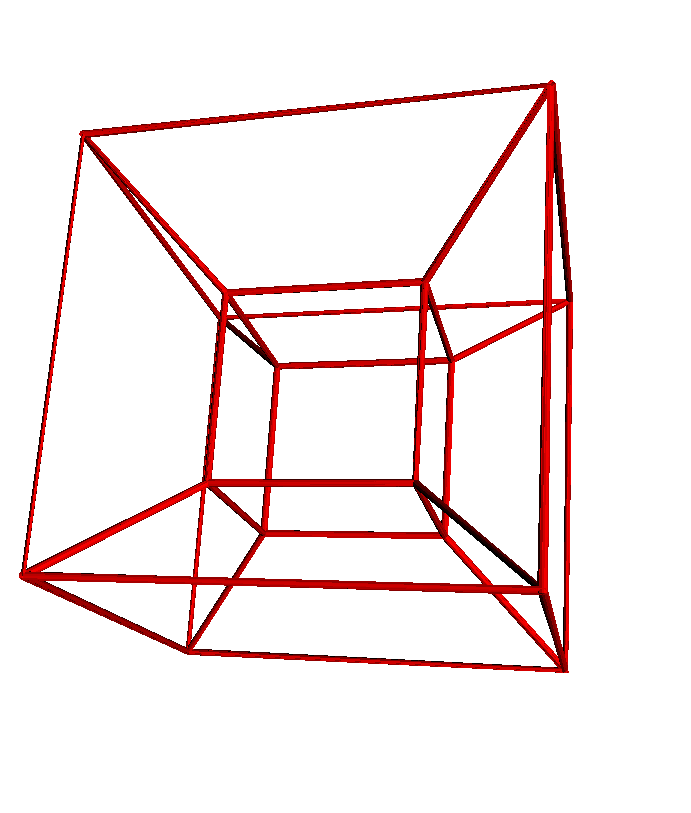
to hyperCube =
nsides = 10
radius = 0.1
moveto 0,0,0
size = 5
for i in 0..4
move size
yaw 90
end
pitch 90
move size
pitch 90
for i in 0..4
move size
yaw 90
end
pitch -90
move size
yaw -90
move size
pitch -90
move size
yaw 90
move size
pitch 90
move size
pitch 90
move -size
outerCubeDiag = 3
moveto 0,0,0moveto -3,-3,3
moveto 0,0,0
moveto 5,0,0
moveto 8,-3,3
moveto -3,-3,3
moveto 0, 0, 0
moveto 0,0,-5
moveto -3,-3,-8
moveto -3,-3,3
moveto 0,0,0
moveto 0,5,0
moveto -3,8,3
moveto -3,-3,3
moveto 8,-3,3
moveto 8,8,3
moveto 5,5,0
moveto 8,8,3
moveto -3, 8, 3
moveto -3,8,-8
moveto 0,5,-5
moveto -3,8,-8
moveto -3,-3,-8
moveto 8,-3,-8
moveto 5,0,-5
moveto 5,5,-5
moveto 8,8,-8
moveto 8,-3,-8
moveto 8, -3, 3
moveto 8,8,3
moveto 8,8,-8
moveto -3,8,-8end
hyperCube
tubeNext I decided to mess around with the fibonacci numbers a bit. Some of the other representations of them that came up were cool ,but I thought the pyramid was the most interesting. You can find so many images and shapes in the pyramid as you move around and change the perspective. In a couple instances the pyramid sort of looks like it is coming out of the screen.
to fibPyramid =
nsides = 30
radius = 0.1
fib = 0
fibStart = 0
fibNext = 1for t to 25
fib = fibStart + fibNext
fibStart = fibNext
fibNext = fibmoveto fib, 0 , 0
moveto 0, fib, 0
moveto 0, 0, fib
end
end
fibPyramid
After the I messed around with the fibonacci numbers I decided to turn towards different math equations. I started simple with changing the coordinates by different sin value as it approaches a full circle.
to begin =
x = 0.1
y = 0.1
–moveto 0,0,0
nsides = 30
radius = 0.05
for t to 361
x = sin 2*t
y = sin 3*t
z = sin 7*t
moveto x,y,z
end
end
begin
tube
Once I had the hang of things a bit I decided to find some equations that I thought might look cool. This is utilizing the equation for a tear drop. I tried messing around with the area to create a 3D tear but it didn’t look as good to me.
to tearDrop =
x = 0.1
y = 0.1
–moveto 0,0,0
nsides = 30
radius = 0.05
for t to 361
x = cos tfor m to 7
y = (sin t) * (sin t//2) ^ m
a = (4*(3.14)^0.5) * (0.5*(3+m))//(3+0.5*m)moveto x,y,0
endend
endtearDrop
–fracture = 1–tube
–dotssurface 361, 7
This is another equation I found that looked cool. My attempt at a Chrysanthemum.
to chrysanthemum =
nsides = 30
radius = 0.05for u to 361*2
r = 5 * (1 + sin(11* u // 5)) – 4 * (sin (17 *u // 3))^4 * sin (2 *(cos(3* u))^8 – 28 * u)
x = r * cos u
y = r * sin umoveto x,y,r
end
endchrysanthemum
–tube
–dotssurface 361,2
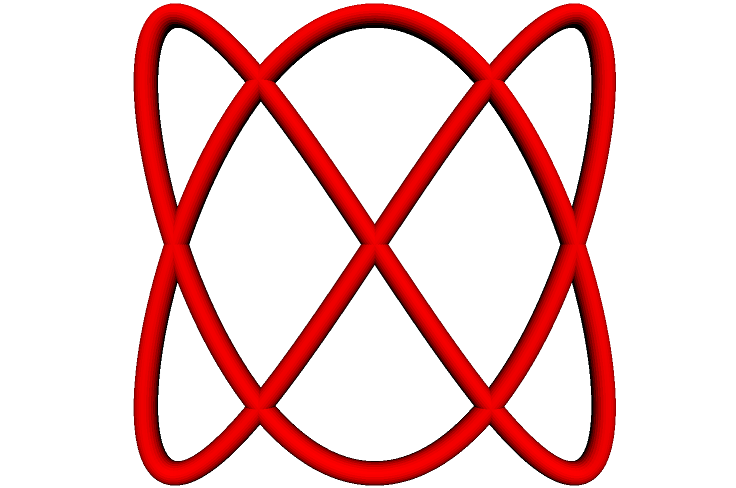
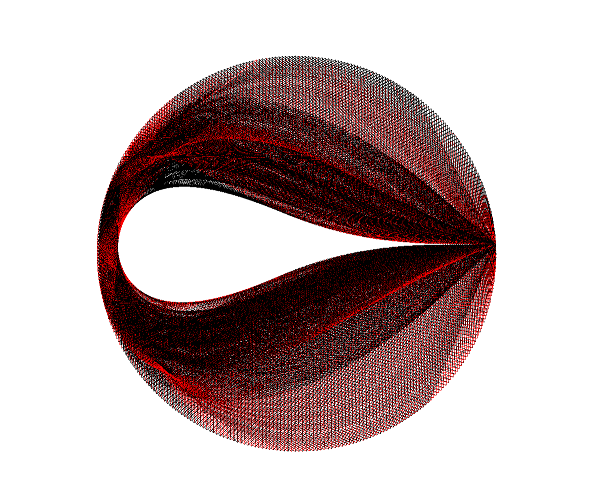
The last one I made isn’t anything specific I know the name of. I was messing around with a few spiral equations for a while and it eventually turned into this.





]]>to spiralStrip =
nsides = 30
radius = 1
r = 5
step = 5
z = 3
a = 0
for a to 10
for t to 361r = ((a^2) * 1.61)^0.5
x = r * cos t
y = r * sin t
moveto a*x, a*y, t
end
end
endspiralStrip
–fracture = 1tube
–surface 361, 10
–dots–surface 361,2
–revolve 0,0,1,180
Had a lot of fun with this assignment!
p.s. I tried messing with some fractal equations and I don’t know if it is possible, but I think it would be cool if you could switch into a mode that dealt with more continuous functionality. Maybe another side window to script in that manipulates your geometry.
Deprecated: Creation of dynamic property WP_Term::$cat_ID is deprecated in /var/www/twodee/blog/wp-includes/category.php on line 378
Deprecated: Creation of dynamic property WP_Term::$category_count is deprecated in /var/www/twodee/blog/wp-includes/category.php on line 379
Deprecated: Creation of dynamic property WP_Term::$category_description is deprecated in /var/www/twodee/blog/wp-includes/category.php on line 380
Deprecated: Creation of dynamic property WP_Term::$cat_name is deprecated in /var/www/twodee/blog/wp-includes/category.php on line 381
Deprecated: Creation of dynamic property WP_Term::$category_nicename is deprecated in /var/www/twodee/blog/wp-includes/category.php on line 382
Deprecated: Creation of dynamic property WP_Term::$category_parent is deprecated in /var/www/twodee/blog/wp-includes/category.php on line 383
Overall things went well. I have a few glitches when the magnets interact from the sides, but for the most part everything seems to be working as expected. The approach I took was to tackle the geometry first. I wanted to get all the rectangles placed and colored in the right way before I would [...]]]>
Deprecated: ltrim(): Passing null to parameter #1 ($string) of type string is deprecated in /var/www/twodee/blog/wp-includes/wp-db.php on line 3030
Here are some examples:


Deprecated: Creation of dynamic property WP_Term::$cat_ID is deprecated in /var/www/twodee/blog/wp-includes/category.php on line 378
Deprecated: Creation of dynamic property WP_Term::$category_count is deprecated in /var/www/twodee/blog/wp-includes/category.php on line 379
Deprecated: Creation of dynamic property WP_Term::$category_description is deprecated in /var/www/twodee/blog/wp-includes/category.php on line 380
Deprecated: Creation of dynamic property WP_Term::$cat_name is deprecated in /var/www/twodee/blog/wp-includes/category.php on line 381
Deprecated: Creation of dynamic property WP_Term::$category_nicename is deprecated in /var/www/twodee/blog/wp-includes/category.php on line 382
Deprecated: Creation of dynamic property WP_Term::$category_parent is deprecated in /var/www/twodee/blog/wp-includes/category.php on line 383
Overall creating the Image class went well. The only hang up I really had was trying to convince myself that the image that was being produced was reasonable. Other than that, trying to debug by looking at the ppm file was kind of troublesome. This is one bump This is 250 [...]]]>
Deprecated: ltrim(): Passing null to parameter #1 ($string) of type string is deprecated in /var/www/twodee/blog/wp-includes/wp-db.php on line 3030
Overall creating the Image class went well. The only hang up I really had was trying to convince myself that the image that was being produced was reasonable. Other than that, trying to debug by looking at the ppm file was kind of troublesome.
This is one bump

This is 250 bumps

Deprecated: Creation of dynamic property WP_Term::$cat_ID is deprecated in /var/www/twodee/blog/wp-includes/category.php on line 378
Deprecated: Creation of dynamic property WP_Term::$category_count is deprecated in /var/www/twodee/blog/wp-includes/category.php on line 379
Deprecated: Creation of dynamic property WP_Term::$category_description is deprecated in /var/www/twodee/blog/wp-includes/category.php on line 380
Deprecated: Creation of dynamic property WP_Term::$cat_name is deprecated in /var/www/twodee/blog/wp-includes/category.php on line 381
Deprecated: Creation of dynamic property WP_Term::$category_nicename is deprecated in /var/www/twodee/blog/wp-includes/category.php on line 382
Deprecated: Creation of dynamic property WP_Term::$category_parent is deprecated in /var/www/twodee/blog/wp-includes/category.php on line 383
]]>
Deprecated: ltrim(): Passing null to parameter #1 ($string) of type string is deprecated in /var/www/twodee/blog/wp-includes/wp-db.php on line 3030
 ]]>
Deprecated: Creation of dynamic property WP_Term::$cat_ID is deprecated in /var/www/twodee/blog/wp-includes/category.php on line 378
Deprecated: Creation of dynamic property WP_Term::$category_count is deprecated in /var/www/twodee/blog/wp-includes/category.php on line 379
Deprecated: Creation of dynamic property WP_Term::$category_description is deprecated in /var/www/twodee/blog/wp-includes/category.php on line 380
Deprecated: Creation of dynamic property WP_Term::$cat_name is deprecated in /var/www/twodee/blog/wp-includes/category.php on line 381
Deprecated: Creation of dynamic property WP_Term::$category_nicename is deprecated in /var/www/twodee/blog/wp-includes/category.php on line 382
Deprecated: Creation of dynamic property WP_Term::$category_parent is deprecated in /var/www/twodee/blog/wp-includes/category.php on line 383
-what you do effects the big picture, affect look of the game
-ex. talking to someone influences them to explode a building half way through the game
-In game puzzle ideas
-Horror maze puzzle
-two different monsters, one comes at you with a light on and one comes at you with the light of, so find a way to balance the light and dark
-Polarity puzzle
-change the color of the room to white and black, black objects can pass through white objects and sit on other black objects, while white objects can pass through black objects and sit on other white objects
-Possibly elaborate on our current time based game idea
]]>
Deprecated: Creation of dynamic property WP_Term::$cat_ID is deprecated in /var/www/twodee/blog/wp-includes/category.php on line 378
Deprecated: Creation of dynamic property WP_Term::$category_count is deprecated in /var/www/twodee/blog/wp-includes/category.php on line 379
Deprecated: Creation of dynamic property WP_Term::$category_description is deprecated in /var/www/twodee/blog/wp-includes/category.php on line 380
Deprecated: Creation of dynamic property WP_Term::$cat_name is deprecated in /var/www/twodee/blog/wp-includes/category.php on line 381
Deprecated: Creation of dynamic property WP_Term::$category_nicename is deprecated in /var/www/twodee/blog/wp-includes/category.php on line 382
Deprecated: Creation of dynamic property WP_Term::$category_parent is deprecated in /var/www/twodee/blog/wp-includes/category.php on line 383
]]>
Deprecated: ltrim(): Passing null to parameter #1 ($string) of type string is deprecated in /var/www/twodee/blog/wp-includes/wp-db.php on line 3030
 ]]>
Deprecated: Creation of dynamic property WP_Term::$cat_ID is deprecated in /var/www/twodee/blog/wp-includes/category.php on line 378
Deprecated: Creation of dynamic property WP_Term::$category_count is deprecated in /var/www/twodee/blog/wp-includes/category.php on line 379
Deprecated: Creation of dynamic property WP_Term::$category_description is deprecated in /var/www/twodee/blog/wp-includes/category.php on line 380
Deprecated: Creation of dynamic property WP_Term::$cat_name is deprecated in /var/www/twodee/blog/wp-includes/category.php on line 381
Deprecated: Creation of dynamic property WP_Term::$category_nicename is deprecated in /var/www/twodee/blog/wp-includes/category.php on line 382
Deprecated: Creation of dynamic property WP_Term::$category_parent is deprecated in /var/www/twodee/blog/wp-includes/category.php on line 383
Deprecated: Creation of dynamic property WP_Term::$cat_ID is deprecated in /var/www/twodee/blog/wp-includes/category.php on line 378
Deprecated: Creation of dynamic property WP_Term::$category_count is deprecated in /var/www/twodee/blog/wp-includes/category.php on line 379
Deprecated: Creation of dynamic property WP_Term::$category_description is deprecated in /var/www/twodee/blog/wp-includes/category.php on line 380
Deprecated: Creation of dynamic property WP_Term::$cat_name is deprecated in /var/www/twodee/blog/wp-includes/category.php on line 381
Deprecated: Creation of dynamic property WP_Term::$category_nicename is deprecated in /var/www/twodee/blog/wp-includes/category.php on line 382
Deprecated: Creation of dynamic property WP_Term::$category_parent is deprecated in /var/www/twodee/blog/wp-includes/category.php on line 383
Deprecated: Creation of dynamic property WP_Term::$cat_ID is deprecated in /var/www/twodee/blog/wp-includes/category.php on line 378
Deprecated: Creation of dynamic property WP_Term::$category_count is deprecated in /var/www/twodee/blog/wp-includes/category.php on line 379
Deprecated: Creation of dynamic property WP_Term::$category_description is deprecated in /var/www/twodee/blog/wp-includes/category.php on line 380
Deprecated: Creation of dynamic property WP_Term::$cat_name is deprecated in /var/www/twodee/blog/wp-includes/category.php on line 381
Deprecated: Creation of dynamic property WP_Term::$category_nicename is deprecated in /var/www/twodee/blog/wp-includes/category.php on line 382
Deprecated: Creation of dynamic property WP_Term::$category_parent is deprecated in /var/www/twodee/blog/wp-includes/category.php on line 383
]]>
Deprecated: ltrim(): Passing null to parameter #1 ($string) of type string is deprecated in /var/www/twodee/blog/wp-includes/wp-db.php on line 3030
 ]]>