Deprecated: Creation of dynamic property WP_Term::$cat_ID is deprecated in /var/www/twodee/blog/wp-includes/category.php on line 378
Deprecated: Creation of dynamic property WP_Term::$category_count is deprecated in /var/www/twodee/blog/wp-includes/category.php on line 379
Deprecated: Creation of dynamic property WP_Term::$category_description is deprecated in /var/www/twodee/blog/wp-includes/category.php on line 380
Deprecated: Creation of dynamic property WP_Term::$cat_name is deprecated in /var/www/twodee/blog/wp-includes/category.php on line 381
Deprecated: Creation of dynamic property WP_Term::$category_nicename is deprecated in /var/www/twodee/blog/wp-includes/category.php on line 382
Deprecated: Creation of dynamic property WP_Term::$category_parent is deprecated in /var/www/twodee/blog/wp-includes/category.php on line 383
Deprecated: parse_str(): Passing null to parameter #1 ($string) of type string is deprecated in /var/www/twodee/blog/wp-content/plugins/jetpack/class.jetpack.php on line 4255
Deprecated: Creation of dynamic property Jetpack_Carousel::$localize_strings is deprecated in /var/www/twodee/blog/wp-content/plugins/jetpack/modules/carousel/jetpack-carousel.php on line 339
I first almost gave up on this assignment, as I saw that the instruction was soooo short and I have no idea how to do any of the requirements. Luckily, I found out that the environment lab has already incorporated more than half of the things needed for this assignment, so I tried to add [...]]]>
Deprecated: ltrim(): Passing null to parameter #1 ($string) of type string is deprecated in /var/www/twodee/blog/wp-includes/wp-db.php on line 3030
close shot on the specular (the white part is the reflected light):

Overall shot:

Deprecated: Creation of dynamic property WP_Term::$cat_ID is deprecated in /var/www/twodee/blog/wp-includes/category.php on line 378
Deprecated: Creation of dynamic property WP_Term::$category_count is deprecated in /var/www/twodee/blog/wp-includes/category.php on line 379
Deprecated: Creation of dynamic property WP_Term::$category_description is deprecated in /var/www/twodee/blog/wp-includes/category.php on line 380
Deprecated: Creation of dynamic property WP_Term::$cat_name is deprecated in /var/www/twodee/blog/wp-includes/category.php on line 381
Deprecated: Creation of dynamic property WP_Term::$category_nicename is deprecated in /var/www/twodee/blog/wp-includes/category.php on line 382
Deprecated: Creation of dynamic property WP_Term::$category_parent is deprecated in /var/www/twodee/blog/wp-includes/category.php on line 383
My thought process was…hey, didn’t we already cover all of these concepts in labs? WE DID! SWEET! And then it was a mashing of code together on the environment lab. I originally wanted to texture each object separately, but when simply texturing them something different [...]]]>
Deprecated: ltrim(): Passing null to parameter #1 ($string) of type string is deprecated in /var/www/twodee/blog/wp-includes/wp-db.php on line 3030

My thought process was…hey, didn’t we already cover all of these concepts in labs? WE DID! SWEET! And then it was a mashing of code together on the environment lab. I originally wanted to texture each object separately, but when simply texturing them something different than the outer box was a huge hassle (probably done wrong) I thought, everything is coppery – perfect!
A hurdle that I encountered was trying to find free .obj files. One website was trying to sell a bonfire.obj for $30! That and neatly applying textures to individual objects. Couldn’t figure it out.
I would have made this beautiful, but it’s finals week and there are tests for which to be anxious.
]]>
Deprecated: Creation of dynamic property WP_Term::$cat_ID is deprecated in /var/www/twodee/blog/wp-includes/category.php on line 378
Deprecated: Creation of dynamic property WP_Term::$category_count is deprecated in /var/www/twodee/blog/wp-includes/category.php on line 379
Deprecated: Creation of dynamic property WP_Term::$category_description is deprecated in /var/www/twodee/blog/wp-includes/category.php on line 380
Deprecated: Creation of dynamic property WP_Term::$cat_name is deprecated in /var/www/twodee/blog/wp-includes/category.php on line 381
Deprecated: Creation of dynamic property WP_Term::$category_nicename is deprecated in /var/www/twodee/blog/wp-includes/category.php on line 382
Deprecated: Creation of dynamic property WP_Term::$category_parent is deprecated in /var/www/twodee/blog/wp-includes/category.php on line 383
My thought process for this was to first figure out how to add more objects and position them how I wanted, then to add texture. I got textures looking nice on a 2d plane but had a bit of trouble on the 3d objects. The first thing I got working was a cube, although pretty [...]]]>
Deprecated: ltrim(): Passing null to parameter #1 ($string) of type string is deprecated in /var/www/twodee/blog/wp-includes/wp-db.php on line 3030

Deprecated: Creation of dynamic property WP_Term::$cat_ID is deprecated in /var/www/twodee/blog/wp-includes/category.php on line 378
Deprecated: Creation of dynamic property WP_Term::$category_count is deprecated in /var/www/twodee/blog/wp-includes/category.php on line 379
Deprecated: Creation of dynamic property WP_Term::$category_description is deprecated in /var/www/twodee/blog/wp-includes/category.php on line 380
Deprecated: Creation of dynamic property WP_Term::$cat_name is deprecated in /var/www/twodee/blog/wp-includes/category.php on line 381
Deprecated: Creation of dynamic property WP_Term::$category_nicename is deprecated in /var/www/twodee/blog/wp-includes/category.php on line 382
Deprecated: Creation of dynamic property WP_Term::$category_parent is deprecated in /var/www/twodee/blog/wp-includes/category.php on line 383
The first thing that I decided to try and make was a hyper cube. I wasn’t to familiar with how the language worked so I ended up just using a bunch of hardcoded moveto commands. I had some trouble figuring out if the push and pop command worked or if I was just [...]]]>
Deprecated: ltrim(): Passing null to parameter #1 ($string) of type string is deprecated in /var/www/twodee/blog/wp-includes/wp-db.php on line 3030
The first thing that I decided to try and make was a hyper cube. I wasn’t to familiar with how the language worked so I ended up just using a bunch of hardcoded moveto commands. I had some trouble figuring out if the push and pop command worked or if I was just using it incorrectly, so I end up retracing a lot of lines that I would have rather popped back to .
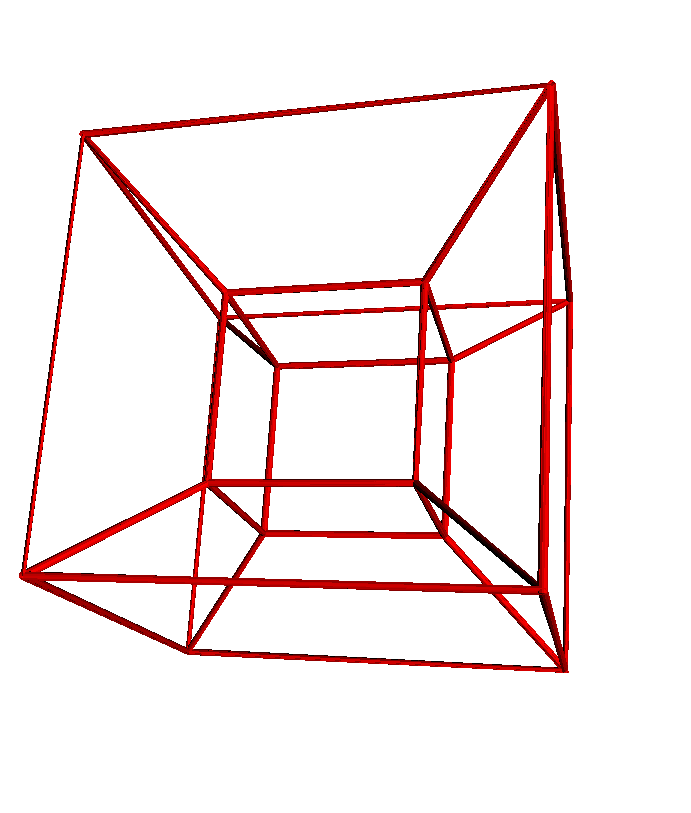
to hyperCube =
nsides = 10
radius = 0.1
moveto 0,0,0
size = 5
for i in 0..4
move size
yaw 90
end
pitch 90
move size
pitch 90
for i in 0..4
move size
yaw 90
end
pitch -90
move size
yaw -90
move size
pitch -90
move size
yaw 90
move size
pitch 90
move size
pitch 90
move -size
outerCubeDiag = 3
moveto 0,0,0moveto -3,-3,3
moveto 0,0,0
moveto 5,0,0
moveto 8,-3,3
moveto -3,-3,3
moveto 0, 0, 0
moveto 0,0,-5
moveto -3,-3,-8
moveto -3,-3,3
moveto 0,0,0
moveto 0,5,0
moveto -3,8,3
moveto -3,-3,3
moveto 8,-3,3
moveto 8,8,3
moveto 5,5,0
moveto 8,8,3
moveto -3, 8, 3
moveto -3,8,-8
moveto 0,5,-5
moveto -3,8,-8
moveto -3,-3,-8
moveto 8,-3,-8
moveto 5,0,-5
moveto 5,5,-5
moveto 8,8,-8
moveto 8,-3,-8
moveto 8, -3, 3
moveto 8,8,3
moveto 8,8,-8
moveto -3,8,-8end
hyperCube
tubeNext I decided to mess around with the fibonacci numbers a bit. Some of the other representations of them that came up were cool ,but I thought the pyramid was the most interesting. You can find so many images and shapes in the pyramid as you move around and change the perspective. In a couple instances the pyramid sort of looks like it is coming out of the screen.
to fibPyramid =
nsides = 30
radius = 0.1
fib = 0
fibStart = 0
fibNext = 1for t to 25
fib = fibStart + fibNext
fibStart = fibNext
fibNext = fibmoveto fib, 0 , 0
moveto 0, fib, 0
moveto 0, 0, fib
end
end
fibPyramid
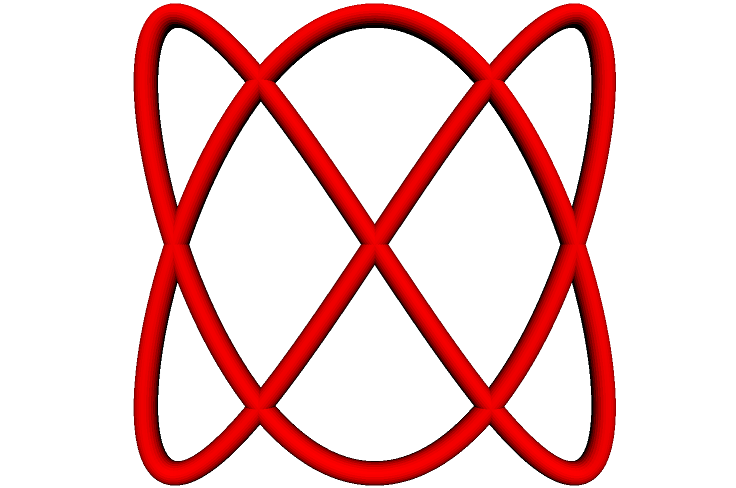
After the I messed around with the fibonacci numbers I decided to turn towards different math equations. I started simple with changing the coordinates by different sin value as it approaches a full circle.
to begin =
x = 0.1
y = 0.1
–moveto 0,0,0
nsides = 30
radius = 0.05
for t to 361
x = sin 2*t
y = sin 3*t
z = sin 7*t
moveto x,y,z
end
end
begin
tube
Once I had the hang of things a bit I decided to find some equations that I thought might look cool. This is utilizing the equation for a tear drop. I tried messing around with the area to create a 3D tear but it didn’t look as good to me.
to tearDrop =
x = 0.1
y = 0.1
–moveto 0,0,0
nsides = 30
radius = 0.05
for t to 361
x = cos tfor m to 7
y = (sin t) * (sin t//2) ^ m
a = (4*(3.14)^0.5) * (0.5*(3+m))//(3+0.5*m)moveto x,y,0
endend
endtearDrop
–fracture = 1–tube
–dotssurface 361, 7
This is another equation I found that looked cool. My attempt at a Chrysanthemum.
to chrysanthemum =
nsides = 30
radius = 0.05for u to 361*2
r = 5 * (1 + sin(11* u // 5)) – 4 * (sin (17 *u // 3))^4 * sin (2 *(cos(3* u))^8 – 28 * u)
x = r * cos u
y = r * sin umoveto x,y,r
end
endchrysanthemum
–tube
–dotssurface 361,2
The last one I made isn’t anything specific I know the name of. I was messing around with a few spiral equations for a while and it eventually turned into this.



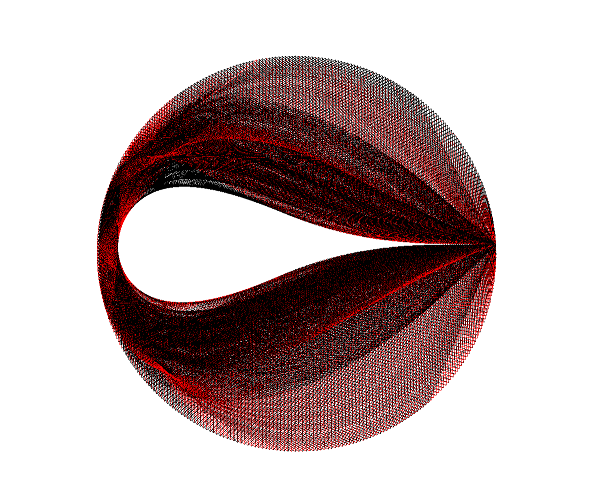


]]>to spiralStrip =
nsides = 30
radius = 1
r = 5
step = 5
z = 3
a = 0
for a to 10
for t to 361r = ((a^2) * 1.61)^0.5
x = r * cos t
y = r * sin t
moveto a*x, a*y, t
end
end
endspiralStrip
–fracture = 1tube
–surface 361, 10
–dots–surface 361,2
–revolve 0,0,1,180
Had a lot of fun with this assignment!
p.s. I tried messing with some fractal equations and I don’t know if it is possible, but I think it would be cool if you could switch into a mode that dealt with more continuous functionality. Maybe another side window to script in that manipulates your geometry.
Deprecated: Creation of dynamic property WP_Term::$cat_ID is deprecated in /var/www/twodee/blog/wp-includes/category.php on line 378
Deprecated: Creation of dynamic property WP_Term::$category_count is deprecated in /var/www/twodee/blog/wp-includes/category.php on line 379
Deprecated: Creation of dynamic property WP_Term::$category_description is deprecated in /var/www/twodee/blog/wp-includes/category.php on line 380
Deprecated: Creation of dynamic property WP_Term::$cat_name is deprecated in /var/www/twodee/blog/wp-includes/category.php on line 381
Deprecated: Creation of dynamic property WP_Term::$category_nicename is deprecated in /var/www/twodee/blog/wp-includes/category.php on line 382
Deprecated: Creation of dynamic property WP_Term::$category_parent is deprecated in /var/www/twodee/blog/wp-includes/category.php on line 383
I had many hurdles to deal with for this assignment, hence it being so late. I fell behind early in the class so I had to spent the majority of the time working on this just learning what I was supposed to already know. I also struggled with getting the right values in the right [...]]]>
Deprecated: ltrim(): Passing null to parameter #1 ($string) of type string is deprecated in /var/www/twodee/blog/wp-includes/wp-db.php on line 3030

 ]]>
Deprecated: Creation of dynamic property WP_Term::$cat_ID is deprecated in /var/www/twodee/blog/wp-includes/category.php on line 378
Deprecated: Creation of dynamic property WP_Term::$category_count is deprecated in /var/www/twodee/blog/wp-includes/category.php on line 379
Deprecated: Creation of dynamic property WP_Term::$category_description is deprecated in /var/www/twodee/blog/wp-includes/category.php on line 380
Deprecated: Creation of dynamic property WP_Term::$cat_name is deprecated in /var/www/twodee/blog/wp-includes/category.php on line 381
Deprecated: Creation of dynamic property WP_Term::$category_nicename is deprecated in /var/www/twodee/blog/wp-includes/category.php on line 382
Deprecated: Creation of dynamic property WP_Term::$category_parent is deprecated in /var/www/twodee/blog/wp-includes/category.php on line 383
This is was my first model I made. I started with some swirling effects with dot, then I decided to make it look like fire particles coming off of a moving torch. A simple treble cleft which I tried messing around the radius of a tube in order to create thickness. Just [...]]]>
Deprecated: ltrim(): Passing null to parameter #1 ($string) of type string is deprecated in /var/www/twodee/blog/wp-includes/wp-db.php on line 3030

This is was my first model I made. I started with some swirling effects with dot, then I decided to make it look like fire particles coming off of a moving torch.

A simple treble cleft which I tried messing around the radius of a tube in order to create thickness.

Just a pair of Kamina glasses that I thought would be cool to print out.

This model looks cool with “dot” but for the blog picture I decided to go with box instead of dot to make the over a shape more visible in a still image.When I tried to repeat each dimension by 10 I got the “Your model was taking a long time to build. It felt like it was never going to finish! So, I stopped trying. Sorry.” message
]]>Deprecated: Creation of dynamic property WP_Term::$cat_ID is deprecated in /var/www/twodee/blog/wp-includes/category.php on line 378
Deprecated: Creation of dynamic property WP_Term::$category_count is deprecated in /var/www/twodee/blog/wp-includes/category.php on line 379
Deprecated: Creation of dynamic property WP_Term::$category_description is deprecated in /var/www/twodee/blog/wp-includes/category.php on line 380
Deprecated: Creation of dynamic property WP_Term::$cat_name is deprecated in /var/www/twodee/blog/wp-includes/category.php on line 381
Deprecated: Creation of dynamic property WP_Term::$category_nicename is deprecated in /var/www/twodee/blog/wp-includes/category.php on line 382
Deprecated: Creation of dynamic property WP_Term::$category_parent is deprecated in /var/www/twodee/blog/wp-includes/category.php on line 383
Deprecated: Creation of dynamic property WP_Term::$cat_ID is deprecated in /var/www/twodee/blog/wp-includes/category.php on line 378
Deprecated: Creation of dynamic property WP_Term::$category_count is deprecated in /var/www/twodee/blog/wp-includes/category.php on line 379
Deprecated: Creation of dynamic property WP_Term::$category_description is deprecated in /var/www/twodee/blog/wp-includes/category.php on line 380
Deprecated: Creation of dynamic property WP_Term::$cat_name is deprecated in /var/www/twodee/blog/wp-includes/category.php on line 381
Deprecated: Creation of dynamic property WP_Term::$category_nicename is deprecated in /var/www/twodee/blog/wp-includes/category.php on line 382
Deprecated: Creation of dynamic property WP_Term::$category_parent is deprecated in /var/www/twodee/blog/wp-includes/category.php on line 383
This is my scene that I generated, consisting of two planets and a wormhole thingy (which is two objects transformed to line up right). This was a combination of a few things we had done, so I just had to organize them and duplicate a few things. The hardest part was getting all of the [...]]]>
Deprecated: ltrim(): Passing null to parameter #1 ($string) of type string is deprecated in /var/www/twodee/blog/wp-includes/wp-db.php on line 3030

Deprecated: Creation of dynamic property WP_Term::$cat_ID is deprecated in /var/www/twodee/blog/wp-includes/category.php on line 378
Deprecated: Creation of dynamic property WP_Term::$category_count is deprecated in /var/www/twodee/blog/wp-includes/category.php on line 379
Deprecated: Creation of dynamic property WP_Term::$category_description is deprecated in /var/www/twodee/blog/wp-includes/category.php on line 380
Deprecated: Creation of dynamic property WP_Term::$cat_name is deprecated in /var/www/twodee/blog/wp-includes/category.php on line 381
Deprecated: Creation of dynamic property WP_Term::$category_nicename is deprecated in /var/www/twodee/blog/wp-includes/category.php on line 382
Deprecated: Creation of dynamic property WP_Term::$category_parent is deprecated in /var/www/twodee/blog/wp-includes/category.php on line 383
- what ?s
- review time
Haiku
Which sword is better?
The unchecked one or the checked?
Well, I’ve got two hands
Deprecated: Creation of dynamic property WP_Term::$cat_ID is deprecated in /var/www/twodee/blog/wp-includes/category.php on line 378
Deprecated: Creation of dynamic property WP_Term::$category_count is deprecated in /var/www/twodee/blog/wp-includes/category.php on line 379
Deprecated: Creation of dynamic property WP_Term::$category_description is deprecated in /var/www/twodee/blog/wp-includes/category.php on line 380
Deprecated: Creation of dynamic property WP_Term::$cat_name is deprecated in /var/www/twodee/blog/wp-includes/category.php on line 381
Deprecated: Creation of dynamic property WP_Term::$category_nicename is deprecated in /var/www/twodee/blog/wp-includes/category.php on line 382
Deprecated: Creation of dynamic property WP_Term::$category_parent is deprecated in /var/www/twodee/blog/wp-includes/category.php on line 383
My thought process was to make things that no one else had made to the best of my knowledge, that way i can be interesting. I used the tube function a lot as it allowed for nice circular or square for giving things a definite shape. Overall it wasn’t too bad doing these, it [...]]]>
Deprecated: ltrim(): Passing null to parameter #1 ($string) of type string is deprecated in /var/www/twodee/blog/wp-includes/wp-db.php on line 3030


My thought process was to make things that no one else had made to the best of my knowledge, that way i can be interesting. I used the tube function a lot as it allowed for nice circular or square for giving things a definite shape. Overall it wasn’t too bad doing these, it was quite enjoyable. A few debug problems here and there but as this wasn’t too large of code, finding problems was easy. it was really all about how to turn math and coordinates into shapes. If you don’t know geometry you would have had a bad time
]]>