Deprecated: Creation of dynamic property WP_Term::$cat_ID is deprecated in /var/www/twodee/blog/wp-includes/category.php on line 378
Deprecated: Creation of dynamic property WP_Term::$category_count is deprecated in /var/www/twodee/blog/wp-includes/category.php on line 379
Deprecated: Creation of dynamic property WP_Term::$category_description is deprecated in /var/www/twodee/blog/wp-includes/category.php on line 380
Deprecated: Creation of dynamic property WP_Term::$cat_name is deprecated in /var/www/twodee/blog/wp-includes/category.php on line 381
Deprecated: Creation of dynamic property WP_Term::$category_nicename is deprecated in /var/www/twodee/blog/wp-includes/category.php on line 382
Deprecated: Creation of dynamic property WP_Term::$category_parent is deprecated in /var/www/twodee/blog/wp-includes/category.php on line 383
Deprecated: Creation of dynamic property WP_Term::$cat_ID is deprecated in /var/www/twodee/blog/wp-includes/category.php on line 378
Deprecated: Creation of dynamic property WP_Term::$category_count is deprecated in /var/www/twodee/blog/wp-includes/category.php on line 379
Deprecated: Creation of dynamic property WP_Term::$category_description is deprecated in /var/www/twodee/blog/wp-includes/category.php on line 380
Deprecated: Creation of dynamic property WP_Term::$cat_name is deprecated in /var/www/twodee/blog/wp-includes/category.php on line 381
Deprecated: Creation of dynamic property WP_Term::$category_nicename is deprecated in /var/www/twodee/blog/wp-includes/category.php on line 382
Deprecated: Creation of dynamic property WP_Term::$category_parent is deprecated in /var/www/twodee/blog/wp-includes/category.php on line 383
Deprecated: Creation of dynamic property WP_Term::$cat_ID is deprecated in /var/www/twodee/blog/wp-includes/category.php on line 378
Deprecated: Creation of dynamic property WP_Term::$category_count is deprecated in /var/www/twodee/blog/wp-includes/category.php on line 379
Deprecated: Creation of dynamic property WP_Term::$category_description is deprecated in /var/www/twodee/blog/wp-includes/category.php on line 380
Deprecated: Creation of dynamic property WP_Term::$cat_name is deprecated in /var/www/twodee/blog/wp-includes/category.php on line 381
Deprecated: Creation of dynamic property WP_Term::$category_nicename is deprecated in /var/www/twodee/blog/wp-includes/category.php on line 382
Deprecated: Creation of dynamic property WP_Term::$category_parent is deprecated in /var/www/twodee/blog/wp-includes/category.php on line 383
Thus began my pursuit of understanding digital audio. I started programmatically synthesizing my own sounds using sine waves. I read countless books on computer sound, but things always seemed to get wild after chapter 1. I had students in my introductory programming courses learn about arrays and binary files by piecing together their sampled waves into musical sequences and exporting them to WAV files. I had students in a third-year programming languages course build a Java GUI and C++ backend for controlling the harmonic profile of the sounds they generated. I spent two summers working with high schoolers using Pure Data and Arduino to build custom musical instruments. I designed a programming language for learning musical theory.
None of that led me understand how to model the coin pickup sound that so eluded me. DrPetter had left something of a trail to describe the models used for a few of the classes of effects in sfxr, but it was too vague for me to do much with.
Then spring 2020 happened. First, a student asked me if I’d partner with him on an independent study on digital sound. I happily agreed and started building something like sfxr as we learned together. Second, a global pandemic hit, which upended my focus completely. Because our world has stopped, I’ve been able to spend the last few days getting my software into a workable state.
Once I got it working, I played around with the frequency and amplitude envelopes that DrPetter describes in the tutorial. But nothing I made sounded like a coin pickup. So, I went to YouTube and found this video:
A coin sound is just a B in the fifth octave followed by an E in the sixth octave. I could do that. And I did! Here’s me composing the sound effect in Earpiece:
B5 has frequency 987.77, and E6 has frequency 1318.51. As demonstrated on the piano, we roll quickly from the B to the E.
We need a bit of amplitude at the start because the sound needs to intrude on us, not creep in. The amplitude peaks as we roll onto the E and then fades out.
I plan to share other classes of sounds as I learn their mathematical makeup. I’ve also made Earpiece publicly available, but I don’t expect anyone but me to use it. If you figure out how to use it, you are amazing.
Making blips on the computer might seem trivial as the world falls apart. But these coins might have more value than our own pretty soon.
]]>Deprecated: Creation of dynamic property WP_Term::$cat_ID is deprecated in /var/www/twodee/blog/wp-includes/category.php on line 378
Deprecated: Creation of dynamic property WP_Term::$category_count is deprecated in /var/www/twodee/blog/wp-includes/category.php on line 379
Deprecated: Creation of dynamic property WP_Term::$category_description is deprecated in /var/www/twodee/blog/wp-includes/category.php on line 380
Deprecated: Creation of dynamic property WP_Term::$cat_name is deprecated in /var/www/twodee/blog/wp-includes/category.php on line 381
Deprecated: Creation of dynamic property WP_Term::$category_nicename is deprecated in /var/www/twodee/blog/wp-includes/category.php on line 382
Deprecated: Creation of dynamic property WP_Term::$category_parent is deprecated in /var/www/twodee/blog/wp-includes/category.php on line 383
Deprecated: Creation of dynamic property WP_Term::$cat_ID is deprecated in /var/www/twodee/blog/wp-includes/category.php on line 378
Deprecated: Creation of dynamic property WP_Term::$category_count is deprecated in /var/www/twodee/blog/wp-includes/category.php on line 379
Deprecated: Creation of dynamic property WP_Term::$category_description is deprecated in /var/www/twodee/blog/wp-includes/category.php on line 380
Deprecated: Creation of dynamic property WP_Term::$cat_name is deprecated in /var/www/twodee/blog/wp-includes/category.php on line 381
Deprecated: Creation of dynamic property WP_Term::$category_nicename is deprecated in /var/www/twodee/blog/wp-includes/category.php on line 382
Deprecated: Creation of dynamic property WP_Term::$category_parent is deprecated in /var/www/twodee/blog/wp-includes/category.php on line 383
Instead, I found MacPerl: Power and Ease on the shelves at Waldenbooks. A bundled CD-ROM included a free Perl interpreter. That book empowered me to write code. Perl became my first programming language. I fell in love with regular expressions before anyone told me they were hard.
Later I picked up books on HTML and JavaScript. They were too generic for me to remember their titles. As with Perl, I was able to actually do something with HTML and JavaScript as I already had a browser installed. But unlike Perl, these two tools seemed more about making boring old documents than anything else. The most exciting thing I did with them is create a form that translated English to l33t-speak. Meanwhile, in Perl I was making games and hacking into my school’s computer systems. (MacPerl didn’t seem to care about file permissions.)
Fast forward twenty years, and I no longer want to write Perl, Java, or C++, or any language bound to desktop applications ever again. HTML and JavaScript are where I spend my time. To get to this state, I had to wash my brain of its brainwashing. My years of anti-web bias meant that I missed out on much that happened between 2000 and 2020 with HTML, JavaScript, and CSS. I have had some catching up to do.
For instance, I heard about Flexbox years ago, but only recently did I systematically set out to to learn it. To help gain an understanding of its properties, I worked out a little quizzer that randomly generates a flex layout and challenges you to match it.
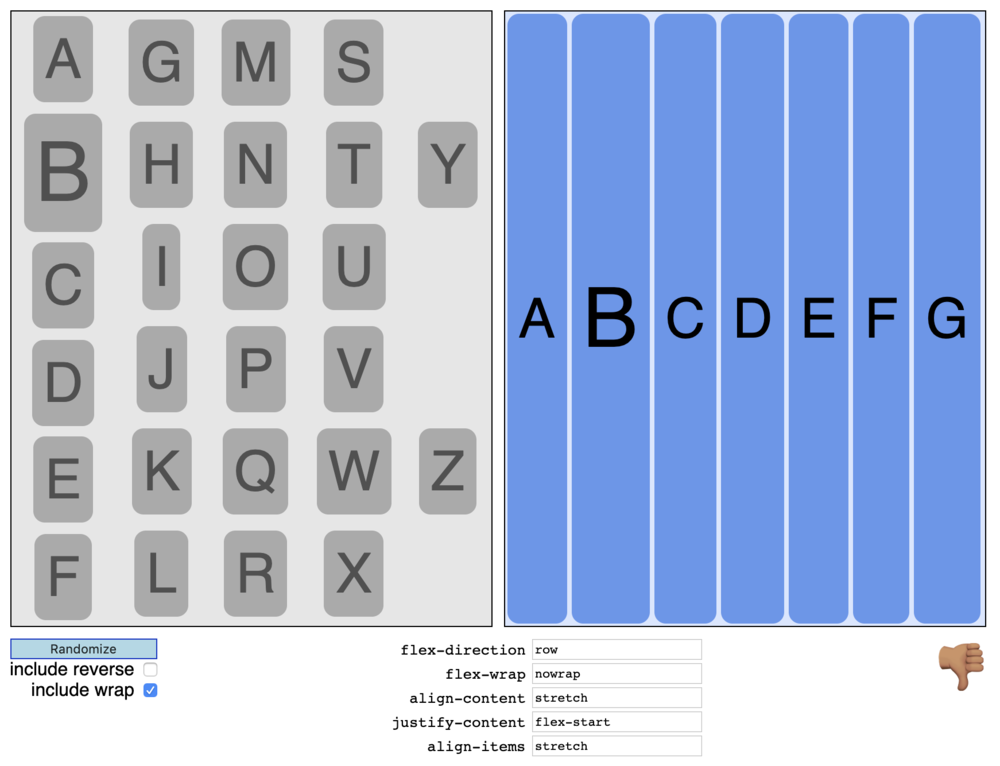
It’s called Flexercise. I can share it with you because it is written in HTML, Javascript, and CSS.
]]>Deprecated: Creation of dynamic property WP_Term::$cat_ID is deprecated in /var/www/twodee/blog/wp-includes/category.php on line 378
Deprecated: Creation of dynamic property WP_Term::$category_count is deprecated in /var/www/twodee/blog/wp-includes/category.php on line 379
Deprecated: Creation of dynamic property WP_Term::$category_description is deprecated in /var/www/twodee/blog/wp-includes/category.php on line 380
Deprecated: Creation of dynamic property WP_Term::$cat_name is deprecated in /var/www/twodee/blog/wp-includes/category.php on line 381
Deprecated: Creation of dynamic property WP_Term::$category_nicename is deprecated in /var/www/twodee/blog/wp-includes/category.php on line 382
Deprecated: Creation of dynamic property WP_Term::$category_parent is deprecated in /var/www/twodee/blog/wp-includes/category.php on line 383
Deprecated: Creation of dynamic property WP_Term::$cat_ID is deprecated in /var/www/twodee/blog/wp-includes/category.php on line 378
Deprecated: Creation of dynamic property WP_Term::$category_count is deprecated in /var/www/twodee/blog/wp-includes/category.php on line 379
Deprecated: Creation of dynamic property WP_Term::$category_description is deprecated in /var/www/twodee/blog/wp-includes/category.php on line 380
Deprecated: Creation of dynamic property WP_Term::$cat_name is deprecated in /var/www/twodee/blog/wp-includes/category.php on line 381
Deprecated: Creation of dynamic property WP_Term::$category_nicename is deprecated in /var/www/twodee/blog/wp-includes/category.php on line 382
Deprecated: Creation of dynamic property WP_Term::$category_parent is deprecated in /var/www/twodee/blog/wp-includes/category.php on line 383
She has more videos and patterns. My son and I wanted to make our own pattern like the fidget spinner one she provides, but the task seemed more pleasurably tackled with mathwork than mousework. So I put together a little utility for assembling such patterns automatically from three source images. And it worked!
Here’s Hexaflexagoner:
]]>Deprecated: Creation of dynamic property WP_Term::$cat_ID is deprecated in /var/www/twodee/blog/wp-includes/category.php on line 378
Deprecated: Creation of dynamic property WP_Term::$category_count is deprecated in /var/www/twodee/blog/wp-includes/category.php on line 379
Deprecated: Creation of dynamic property WP_Term::$category_description is deprecated in /var/www/twodee/blog/wp-includes/category.php on line 380
Deprecated: Creation of dynamic property WP_Term::$cat_name is deprecated in /var/www/twodee/blog/wp-includes/category.php on line 381
Deprecated: Creation of dynamic property WP_Term::$category_nicename is deprecated in /var/www/twodee/blog/wp-includes/category.php on line 382
Deprecated: Creation of dynamic property WP_Term::$category_parent is deprecated in /var/www/twodee/blog/wp-includes/category.php on line 383
Deprecated: Creation of dynamic property WP_Term::$cat_ID is deprecated in /var/www/twodee/blog/wp-includes/category.php on line 378
Deprecated: Creation of dynamic property WP_Term::$category_count is deprecated in /var/www/twodee/blog/wp-includes/category.php on line 379
Deprecated: Creation of dynamic property WP_Term::$category_description is deprecated in /var/www/twodee/blog/wp-includes/category.php on line 380
Deprecated: Creation of dynamic property WP_Term::$cat_name is deprecated in /var/www/twodee/blog/wp-includes/category.php on line 381
Deprecated: Creation of dynamic property WP_Term::$category_nicename is deprecated in /var/www/twodee/blog/wp-includes/category.php on line 382
Deprecated: Creation of dynamic property WP_Term::$category_parent is deprecated in /var/www/twodee/blog/wp-includes/category.php on line 383
Deprecated: Creation of dynamic property WP_Term::$cat_ID is deprecated in /var/www/twodee/blog/wp-includes/category.php on line 378
Deprecated: Creation of dynamic property WP_Term::$category_count is deprecated in /var/www/twodee/blog/wp-includes/category.php on line 379
Deprecated: Creation of dynamic property WP_Term::$category_description is deprecated in /var/www/twodee/blog/wp-includes/category.php on line 380
Deprecated: Creation of dynamic property WP_Term::$cat_name is deprecated in /var/www/twodee/blog/wp-includes/category.php on line 381
Deprecated: Creation of dynamic property WP_Term::$category_nicename is deprecated in /var/www/twodee/blog/wp-includes/category.php on line 382
Deprecated: Creation of dynamic property WP_Term::$category_parent is deprecated in /var/www/twodee/blog/wp-includes/category.php on line 383
Deprecated: parse_str(): Passing null to parameter #1 ($string) of type string is deprecated in /var/www/twodee/blog/wp-content/plugins/jetpack/class.jetpack.php on line 4255
Deprecated: Creation of dynamic property Jetpack_Carousel::$localize_strings is deprecated in /var/www/twodee/blog/wp-content/plugins/jetpack/modules/carousel/jetpack-carousel.php on line 339
When I wanted to record my evolving egg animation, I went looking around for tools that would make it easy to repeatedly capture a particular area of my screen as it evolved. I wanted a stop-motion style of animation, but I could only find tools that recorded continuously. Regular screenshot tools don’t make it easy to [...]]]>
Deprecated: ltrim(): Passing null to parameter #1 ($string) of type string is deprecated in /var/www/twodee/blog/wp-includes/wp-db.php on line 3030
This little animation was Deskstop’s maiden voyage:

I learned way more about transparent window bugs than I wanted to know.
]]>Deprecated: Creation of dynamic property WP_Term::$cat_ID is deprecated in /var/www/twodee/blog/wp-includes/category.php on line 378
Deprecated: Creation of dynamic property WP_Term::$category_count is deprecated in /var/www/twodee/blog/wp-includes/category.php on line 379
Deprecated: Creation of dynamic property WP_Term::$category_description is deprecated in /var/www/twodee/blog/wp-includes/category.php on line 380
Deprecated: Creation of dynamic property WP_Term::$cat_name is deprecated in /var/www/twodee/blog/wp-includes/category.php on line 381
Deprecated: Creation of dynamic property WP_Term::$category_nicename is deprecated in /var/www/twodee/blog/wp-includes/category.php on line 382
Deprecated: Creation of dynamic property WP_Term::$category_parent is deprecated in /var/www/twodee/blog/wp-includes/category.php on line 383
Deprecated: Creation of dynamic property WP_Term::$cat_ID is deprecated in /var/www/twodee/blog/wp-includes/category.php on line 378
Deprecated: Creation of dynamic property WP_Term::$category_count is deprecated in /var/www/twodee/blog/wp-includes/category.php on line 379
Deprecated: Creation of dynamic property WP_Term::$category_description is deprecated in /var/www/twodee/blog/wp-includes/category.php on line 380
Deprecated: Creation of dynamic property WP_Term::$cat_name is deprecated in /var/www/twodee/blog/wp-includes/category.php on line 381
Deprecated: Creation of dynamic property WP_Term::$category_nicename is deprecated in /var/www/twodee/blog/wp-includes/category.php on line 382
Deprecated: Creation of dynamic property WP_Term::$category_parent is deprecated in /var/www/twodee/blog/wp-includes/category.php on line 383
Deprecated: ltrim(): Passing null to parameter #1 ($string) of type string is deprecated in /var/www/twodee/blog/wp-includes/wp-db.php on line 3030
The software lets one “paint” atoms around a 3D scene, measuring and constraining angles, computing electron orbitals, and sketching up input for GAMESS.

A benzene model along with the “brush” palette—the periodic table.
A chemistry student asked me about computational chemistry software the other day, and feeling nostalgic, I decided to download the most recent version of the software I had worked on. To my surprise, I found I had received credit in the about box:

The about box from MacMolPlt.
Thanks, Brett Bode and the federal government, for investing in me. I’m now a better software developer and teacher thanks to that year and a half of tinkering.
]]>Deprecated: Creation of dynamic property WP_Term::$cat_ID is deprecated in /var/www/twodee/blog/wp-includes/category.php on line 378
Deprecated: Creation of dynamic property WP_Term::$category_count is deprecated in /var/www/twodee/blog/wp-includes/category.php on line 379
Deprecated: Creation of dynamic property WP_Term::$category_description is deprecated in /var/www/twodee/blog/wp-includes/category.php on line 380
Deprecated: Creation of dynamic property WP_Term::$cat_name is deprecated in /var/www/twodee/blog/wp-includes/category.php on line 381
Deprecated: Creation of dynamic property WP_Term::$category_nicename is deprecated in /var/www/twodee/blog/wp-includes/category.php on line 382
Deprecated: Creation of dynamic property WP_Term::$category_parent is deprecated in /var/www/twodee/blog/wp-includes/category.php on line 383
Deprecated: Creation of dynamic property WP_Term::$cat_ID is deprecated in /var/www/twodee/blog/wp-includes/category.php on line 378
Deprecated: Creation of dynamic property WP_Term::$category_count is deprecated in /var/www/twodee/blog/wp-includes/category.php on line 379
Deprecated: Creation of dynamic property WP_Term::$category_description is deprecated in /var/www/twodee/blog/wp-includes/category.php on line 380
Deprecated: Creation of dynamic property WP_Term::$cat_name is deprecated in /var/www/twodee/blog/wp-includes/category.php on line 381
Deprecated: Creation of dynamic property WP_Term::$category_nicename is deprecated in /var/www/twodee/blog/wp-includes/category.php on line 382
Deprecated: Creation of dynamic property WP_Term::$category_parent is deprecated in /var/www/twodee/blog/wp-includes/category.php on line 383
Problem: I wanted to record my drawings and derivations on my Android tablet. However, no tools that I could find recorded an Android display at a reasonable speed. Solution: I wrote Deskdrawer to provide a drawing surface that I could mirror on my desktop, where I can record. Check out and download the app at [...]]]>
Deprecated: ltrim(): Passing null to parameter #1 ($string) of type string is deprecated in /var/www/twodee/blog/wp-includes/wp-db.php on line 3030

Problem: I wanted to record my drawings and derivations on my Android tablet. However, no tools that I could find recorded an Android display at a reasonable speed. Solution: I wrote Deskdrawer to provide a drawing surface that I could mirror on my desktop, where I can record.
Check out and download the app at Google Play.
If there’s a feature you’d like to see added, please contact me through Google Play.
Installation
Windows
- Install and run Deskdrawer on your device.
- Install the Android SDK.
- Install the Android platform tools.
- Add an environment variable to point to the Android SDK. To do so, go to Control Panel, click on Advanced System Settings, selected the Advanced tab, and click on Environment Variables. Make a new system variable named ANDROID_HOME with the SDK directory as its value.

- Download the Deskdrawer client. (You’ll need to have Java installed.) Double-click on it to run it. If your device is not listed, you probably do not have drivers for it installed. Post in the comments and we can sort out any issues.
Linux
- Install and run Deskdrawer on your device.
- Install the Android SDK.
- Install the Android platform tools.
- Add an environment variable to point to the Android SDK. To do so, edit $HOME/.profile and add a line like “export ANDROID_HOME=$HOME/path/to/android/sdk”.
- Download the Deskdrawer client. (You’ll need to have Java installed.) Double-click on it to run it. Post in the comments and we can sort out any issues.
Macintosh
- Install and run Deskdrawer on your device.
- Install the Android SDK.
- Install the Android platform tools.
- Open Terminal. Make a directory $HOME/.MacOSX by entering the command
mkdir $HOME/.MacOSXSadly, it’s not easy to do this step through the Finder.
- Add an environment variable pointing to the location where you installed the SDK. Do this by first creating an empty file:
echo "" > $HOME/.MacOSX/environment.plistNow, open TextEdit. You had to make the empty file at the command-line first, because TextEdit won’t let you create new files with a .plist extension. Hit Command-O to bring up the open file dialog box, hit Command-Shift-Period to show hidden files, double click on .MacOSX to enter that directory, and open environment.plist. Paste the following:
<?xml version="1.0" encoding="UTF-8"?>
<!DOCTYPE plist PUBLIC "-//Apple Computer//DTD PLIST 1.0//EN" "http://www.apple.com/DTDs/PropertyList-1.0.dtd">
<plist version="1.0">
<dict>
 <key>ANDROID_HOME</key>
 <string>/Users/<YOU>/path/to/android-sdk-macosx</string>
</dict>
</plist>
Adjust the <YOU>/path/to line to reflect the path of the SDK you installed. Log out and log back in to make your changes effective.
- Download the Deskdrawer client. (You’ll need to have Java installed.) Double-click on it to run it. Post in the comments and we can sort out any issues.
Recording Software
Deskdrawer’s job is to get your drawing surface on your desktop or notebook. From there, you can use existing tools to record your drawings. I’ve had good success with recordMyDesktop and Kazam on Linux and Camtasia on Windows.
]]>